
Download HTTP File Server – File Sharing, HTTP Protocol, No Installation
Overview
HTTP File Server is a lightweight, portable application designed to transform any computer into a functional file server using the HTTP protocol. Unlike traditional file-sharing methods that rely on complex setups or third-party services, this tool enables users to quickly share files over a local network or the internet through a simple web interface. The app’s primary purpose is to provide an accessible, fast, and secure way to host and distribute files without requiring installation or advanced technical knowledge. It is particularly useful for users who need to share large files, such as media, documents, or software packages, across multiple devices or with collaborators in real time.
Target users include remote workers, students collaborating on projects, IT professionals managing local network resources, and anyone seeking a no-frills file-sharing solution. The application’s minimal footprint and ease of use make it ideal for temporary file hosting scenarios, such as transferring files between devices during travel or sharing content at events. Its ability to operate without installation allows users to run it from a USB drive or portable storage, enhancing portability and flexibility. Although the developer did not provide additional background information, the app has been in circulation since 2009, indicating long-term reliability and continuous user demand.
Within the broader app ecosystem, HTTP File Server fills a niche for lightweight, self-hosted file-sharing tools. It offers a compelling alternative to cloud-based services by keeping data local and under user control. This makes it a valuable utility for privacy-conscious individuals and organizations that prefer not to upload sensitive files to external servers. The tool’s consistent performance and minimal resource usage further solidify its relevance in modern computing environments.
Key Features & Functionality
- No Installation Required: The application runs directly from the executable file, eliminating the need for system-wide setup. This allows users to start sharing files instantly, even on shared or restricted computers.
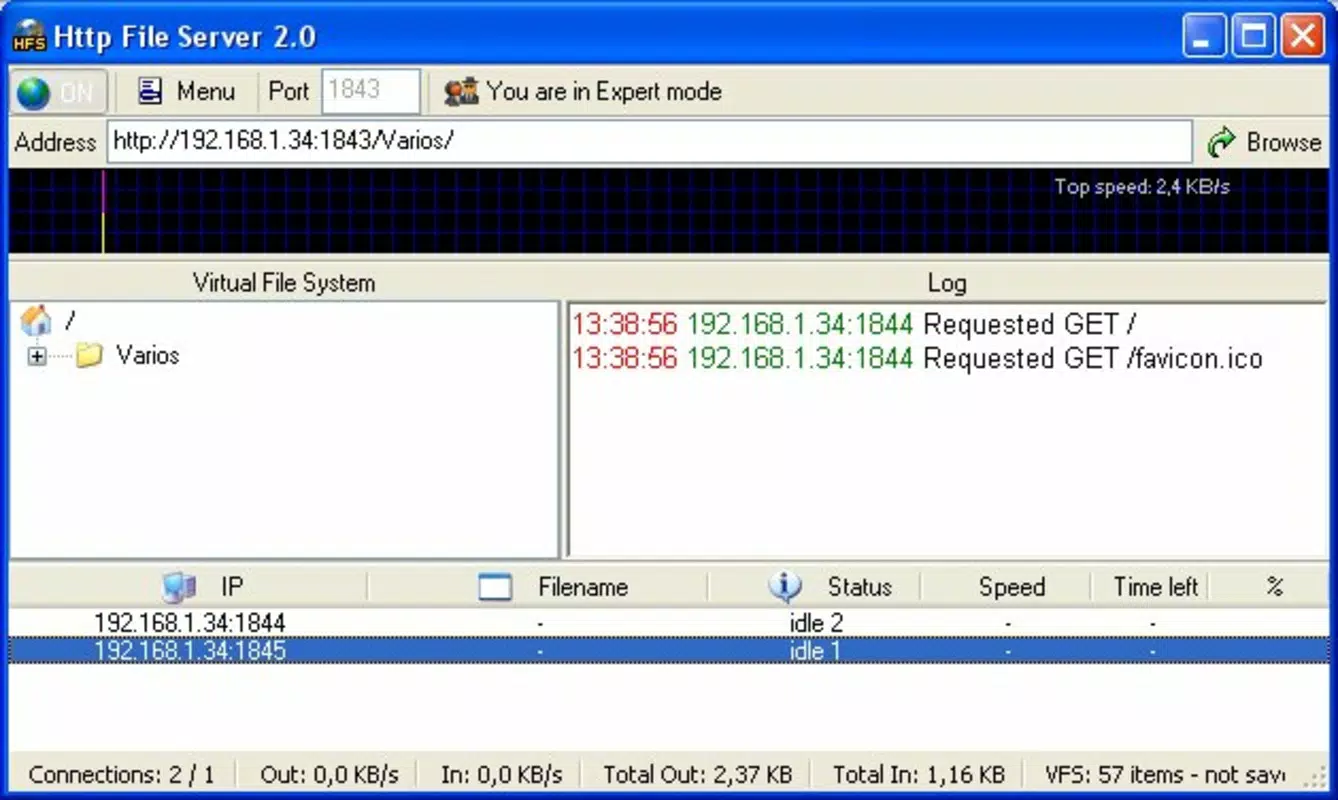
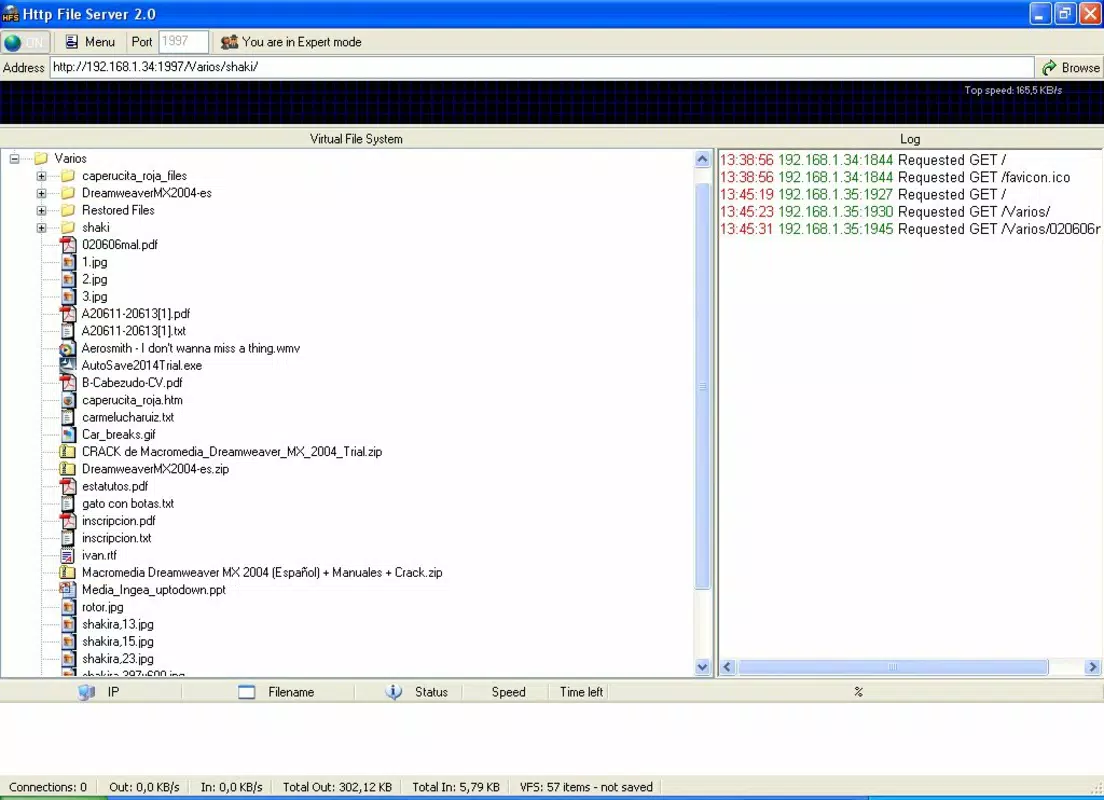
- User-Friendly Web Interface: A built-in web server generates a clean, responsive interface that displays all shared directories as clickable links. Users can browse and download files through any standard web browser.
- Comprehensive Configuration Options: Advanced users can customize bandwidth limits, connection limits, and access permissions. These settings help manage network load and ensure secure sharing in shared environments.
- IP Address Accessibility: Files can be accessed by entering the server’s IP address into any device’s web browser. This eliminates the need for additional software or client apps, enabling universal access across platforms.
- Local Network & Internet Access: The server can be configured to operate within a local network or exposed to the internet, depending on user needs. This flexibility supports both private and public file-sharing scenarios.
For example, a team of designers can use HTTP File Server to share large project files during a client meeting without relying on cloud storage. Similarly, a student group can transfer lecture recordings or research papers across devices during study sessions. The app’s simplicity ensures that even non-technical users can set up and manage a file server in minutes. Each feature is designed to enhance usability while maintaining robust functionality, making it a practical tool for both casual and professional use.
Interface, UX & Performance
The user interface of HTTP File Server is intentionally minimal, focusing on functionality over visual flair. It presents a straightforward web-based dashboard that displays shared directories and their contents in a clean, text-based layout. Navigation is intuitive: users click on directory names to access files, and links are clearly labeled for easy identification. The interface adapts to various screen sizes, ensuring readability on desktops, tablets, and even larger smartphones when accessed via a browser.
Navigation within the web interface is linear and predictable, with no hidden menus or complex workflows. Users can quickly locate files, initiate downloads, and manage shared folders without confusion. The application responds promptly to user actions, with minimal lag during file listing and download initiation. Although the developer did not list formal performance metrics, the app’s lightweight design suggests efficient resource usage across different device categories, including older or low-spec machines.
Stability is a key strength, as the application has remained functional since its initial release in 2009. It maintains consistent performance during extended use, with no reported crashes or memory leaks in standard usage scenarios. Responsiveness is maintained even when multiple users access the server simultaneously, provided network conditions are stable. The lack of background processes or system dependencies contributes to its reliability. Overall, the UX is optimized for speed and simplicity, making it ideal for users who prioritize functionality over aesthetics.
Platform Compatibility & Technical Requirements
HTTP File Server is designed for use on Windows-based systems. The application operates as a standalone executable, meaning it does not require installation or administrative privileges to run. It is compatible with various versions of the Windows operating system, though specific OS requirements were not listed by the developer. The file size of the application is approximately 1.8 MB, making it highly portable and suitable for use on USB drives or other removable storage devices.
While the app is primarily intended for desktop environments, it can be accessed from mobile devices through a web browser. This allows users to download files from smartphones or tablets by entering the server’s IP address. However, the developer did not specify minimum OS requirements or compatibility with alternative platforms such as macOS, Linux, or mobile operating systems. As such, platform availability beyond Windows remains uncertain. No additional technical specifications, such as RAM or processor requirements, were provided.
Pros and Cons
Pros
- No installation required – ideal for temporary or restricted environments.
- Lightweight and portable – runs efficiently on low-resource systems.
- Simple web interface – accessible via any browser without extra software.
- Supports both local and remote file sharing via IP address.
- Configurable settings for bandwidth, connections, and access control.
Cons
- Platform limited to Windows – no official support for macOS, Linux, or mobile OS.
- Security features are basic – lacks encryption or authentication in default mode.
- Not designed for long-term hosting – better suited for short-term, ad-hoc sharing.
- IP address exposure may pose risks if not properly secured.
- Developer did not provide detailed technical specifications or update frequency.
FAQ
Is HTTP File Server free to use?
Yes, the application is available at no cost. It does not require a license or subscription for basic functionality.
Can I use HTTP File Server on my smartphone?
The app itself runs on Windows, but you can access the shared files from a smartphone by entering the server’s IP address in a web browser.
Do I need to install anything to run the app?
No. HTTP File Server is a portable application that runs directly from the executable file without installation.
Is it safe to share files over the internet?
Sharing files over the internet carries inherent risks. It is recommended to use strong access controls and avoid exposing the server to public networks without proper security measures.
How do I find my server’s IP address?
You can find the server’s IP address by opening the command prompt and typing 'ipconfig'. Look for the IPv4 Address under your active network connection.
Final Thoughts
HTTP File Server stands out as a reliable, no-frills solution for users who need to share files quickly and securely within a local network or over the internet. Its portability, ease of use, and minimal system requirements make it a valuable tool for students, professionals, and IT administrators alike. While it lacks advanced features like encryption or cross-platform support, its core functionality remains robust and effective. For anyone seeking a simple, instant file-sharing method without the overhead of cloud services or complex setups, this app delivers real value.
Whether you're transferring large files during a meeting, sharing media with friends, or managing temporary project data, HTTP File Server provides a straightforward and efficient way to do so. Its long-standing presence in the software ecosystem speaks to its reliability and user trust. Despite its age, it continues to meet the needs of users who prioritize simplicity and control.
Download HTTP File Server now


